Using the Regional Data Repository
The Alaska Regional Data Repository (RDR) is a centralized server dedicated to the long-term storage of regional projects and their products. It serves as an accessible and secure digital archive that contains authoritative copies of a project’s data, documents, and metadata. Your program’s data manager and technician are responsible for maintaining the RDR. The Alaska Region Data Stewardship Team (DST) sponsored the creation of the RDR and endorsed its use for the long-term preservation of regional projects and their products More information about the RDR is provided by the DST publication Alaska Regional Data Repository: purpose, organization, and management.
Accessing the RDR
The RDR can be accessed through your web browser or file explorer by copying and pasting the following link into the address bar: \\ifw7ro-file.fws.doi.net\datamgt
The RDR can only be reached when you are connected to the Service network. Also, capabilities are limited when the RDR is accessed using your web browser.
To ensure that files stored in the RDR are protected from loss or corruption, access to files within the Repository are controlled through permissions. Everyone in the Service with a VPN and link to the RDR may read what’s in the Repository, but write and modify permissions are limited and assigned by data managers. For example, data stewards are granted write permission to their project’s “incoming” folder but otherwise have read permission for all other folders.
Organization of the RDR

Directory Template
The _dir_template folder contains the template for regional project folders and their sub-folders. Your data manager will tailor the template to your particular project once your data management plan is approved.
AK_metadata_resources
The AK_metadata_resources folder contains various support file that can help simplify metadata creation. Contents include regional contact lists, various geographic extents, and regional mdEditor profiles.
Contacts
This folder contains the regional contact list. The JSON file contains contact information for staff and external partners. The file should be should be imported into mdEditor to prevent duplicating contacts. Data Managers are responsible for the management of this file.
Extents
The extents-json folder contains GeoJSON files of common project extents, such as NWR boundaries. These can be imported into mdEditor under the “Extent” tab to quickly populate the extent metadata.
Profiles and Schemas
The profiles-schemas-json folder contains a JSON file with the default regional metadata profile and schema. These profiles can be imported into mdEditor and limit the metadata fields displayed to those most relevant, indicate required fields, and provide descriptive error messages to assist staff with metadata creation. Additional information about profiles is available on the Alaska Region mdEditor profiles site.
Program Folders
The RDR contains a folder for each program, and within each program folder are project folders. The programs with RDR folders include:
- Fisheries and Ecological Services (fes)
- Migratory Bird Management (mbm)
- National Wildlife Refuge System (nwrs)
- Office of Subsistence Management (osm)
- Science Applications (sa)
Obtaining Your RDR Project Folder
Completion and data manager approval of your data management plan will trigger the creation of a RDR folder for your project. Your data manager will create the project folder and include a link to it in your data management plan for your reference.
The link to your project’s RDR folder is broken down as follows:

Organization of Your RDR Project Folder
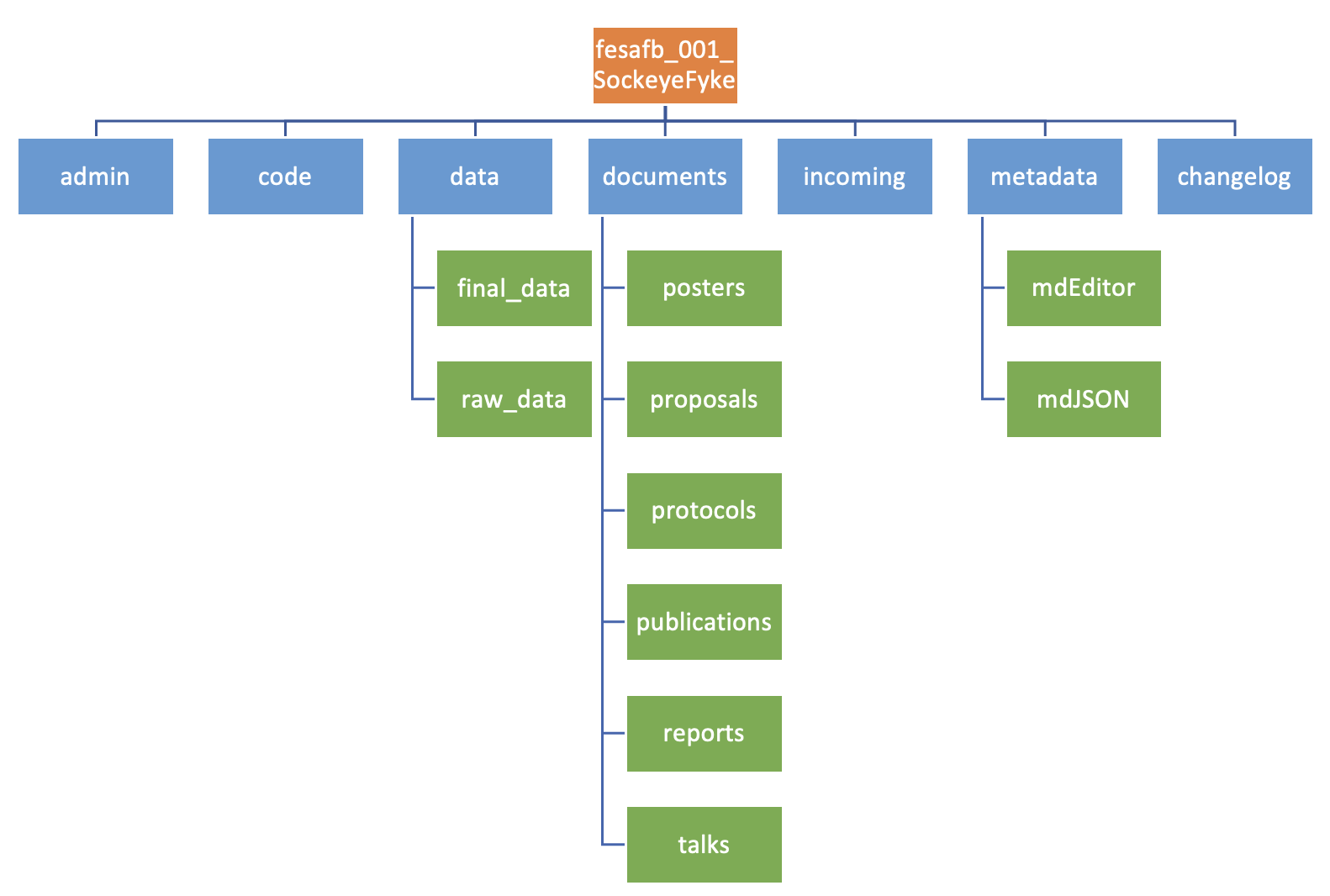
Administration
This folder houses documents related to project implementation and may include:
- contracts and final executed agreements
- correspondence
- permits obtained for project execution
- receipts for significant or unique purchases deemed important to archive
- training materials developed for the project
- significant or unique travel information deemed important to archive
Code
Code used to calculate statistics, develop figures, or tidy tabular data should be filed in this folder. Examples of code include R and Python scripts.
Data
Both raw, unprocessed data and clean, final data should be housed in this folder. Intermediate datasets created during the tidying process do not need to be archived in the RDR.
Documents
Documents generated by the project should be filed in this folder, and they can include:
- Data management plans
- Investigation plans or protocol documents guiding project procedures
- Proposal documents prepared to solicit internal or external funding
- Public relations materials like photographs, graphics, maps, etc.
- Reports and white papers that are not peer-reviewed, but provide results or information from the project
- Final manuscripts and peer-reviewed publications
- Talks, recordings, posters, or presentation slides related to the project
Incoming
This folder is used to add project data, documents, and metadata that are ready to be archived in the RDR. Data Steward(s) have write permissions and should add data after they have been reviewed for metadata completeness. The projects Data Custodian will then properly organize the files that were dropped into this folder. Projects may use alternate methods for archiving data in the RDR (e.g., email data to their data manager).
All files should be saved in an open format and abide by recommended file naming conventions prior to being added to the “incoming” folder.
Metadata
This folder holds mdEditor and mdJSON files of your project metadata, which can be created using mdEditor. Typically, this folder contains a single mdEditor file that encompasses all of your project’s metadata and multiple mdJSON files for individual project and product metadata records.
All files in your project’s RDR folder should be accompanied by metadata.
Change Log
Also referred to as a README file, the changelog is a text file communicating updates made to the RDR project folder. It also includes details about who made those updates and when they were made.